

TIPS Meetings
Keep your team organized and on track, empowering you to focus on solutions that improve outcomes schoolwide.
Add TIPS Meetings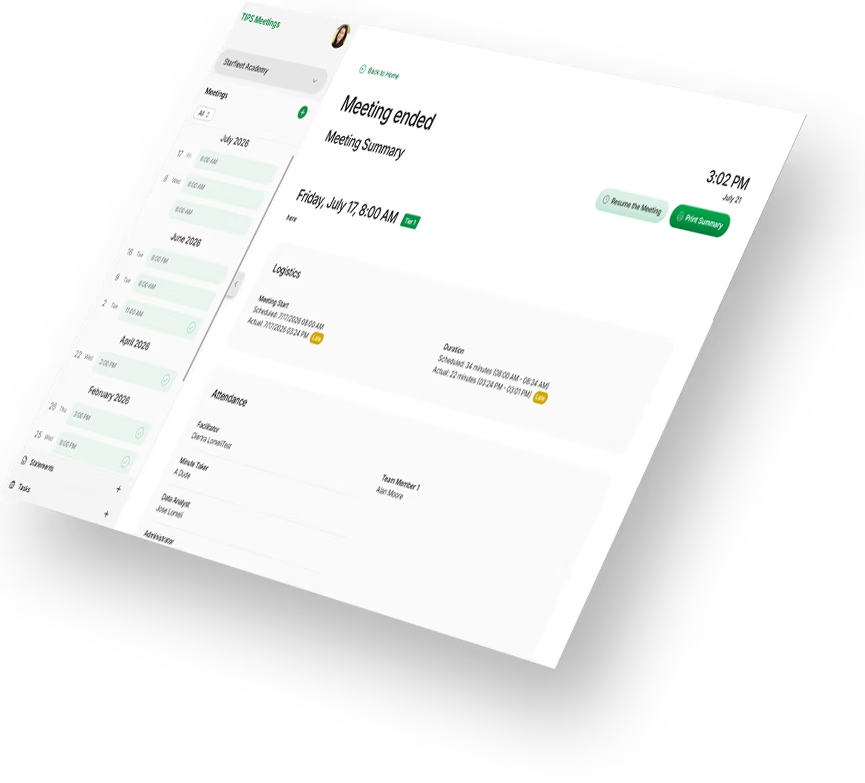

TIPS Meetings keeps your team organized and on track, empowering you to focus on implementing plans that improve outcomes schoolwide.
Data-driven decisions live at the heart of every school’s PBIS implementation. Your team meets to review the data you’ve collected, identify places for improvement, test out possible solutions, and monitor your progress over time. The decision-making process isn’t complicated, but the power is in the details. Enter the Team-Initiated Problem Solving (TIPS) Meetings. On paper, TIPS is a decision-making framework but it’s so much more than that. TIPS is the only scientifically-based, data-driven decision-making process proven to get your schoolwide community the support they need faster than ever.
TIPS Meetings assists your team with the decision-making process every step of the way. It keeps your team organized and on-track, empowering you to focus on solutions that improve outcomes schoolwide. Go beyond filling out the spaces in a meeting agenda. Let TIPS Meetings be your team’s space to review data, create goals, and track next steps for every decision you make.
Never Miss a Step
Each step in TIPS Meetings builds on the one before it, setting your team up for success.
- Set your agenda and roles for the meeting
- Review and discuss any previous business from the last meeting.
- Identify new issues as a team.
- Wrap-up efficiently with tasks assigned.
Quickly Name Issues
Identifying which issues to explore as a team is the first step in the process. Precision is key.
- Guides you through the who, what, when, where, why, and how often to define issues with precision.
- Select which issues to discuss in your current meeting.
- Review a history of previous issues you solved whenever a question arises.
Track Every Task
For every precision statement you draft, TIPS Meetings asks your team to break down your solution into a set of tasks assigned to team members.
- Define the current state of the issue and set a goal for improvement.
- Brainstorm solutions to teach, prevent, reinforce, or extinguish certain behaviors.
- Break down solutions into manageable tasks assigned to team members with due dates.
Stay On Track
We know this meeting isn’t the only thing on your calendar. With the TIPS Meetings timers, not only will you end your meetings on time…you might just end some a little early!
- Decide as a team how long you want to spend discussing each item on your agenda.
- Two timers count down how much time you have left for a given section and how long your meeting runs overall.
- Pause the meeting clock when you need to take a break and click play to pick up right where you left off.
Seamlessly Works With SWIS
Teams using the SWIS Suite appreciate how the framework complements the systems they already have in place.
- SWIS Core Reports narrow your team’s focus to an aspect of your referral data you want to explore.
- Use the SWIS Drill Down Tool to draft your precision statements.
- Save Drill Down report options to monitor the progress you make.

Unlimited Users
Set up and manage as many users as your school needs at no additional cost.
Import Rosters
Skip manual entry—import student and staff records automatically.
Encrypted & Secure
Protect your data with end-to-end encryption, on servers housed behind a secure firewall.
Inclusive Pricing
All features are included out of the box; no hidden fees or subscription levels.
Pricing
$15
/month
Available as an add-on to any SWIS Suite app
TIPS Meetings Is in an Add-On to the SWIS Suite
Using one app in the suite gives you insights you never had before. Use all three and you have yourself a powerful teammate working with you in every decision you make.
CICO-SWIS
Enter Check-in Check-out point card data to monitor student progress and keep an eye on how effective the intervention is for those enrolled.
More InfoI-SWIS
Set up customized data entry screens and start monitoring even the most complex individual student support plans in your building.
More InfoSchools
students
Integrations
Years
Ready to get started?
Step one is to contact a SWIS facilitator in your area. Facilitators support schools throughout the process of setting up subscriptions, training new users, and coaching teams to make data-driven decisions. If you can't find a facilitator or you are ready to become a facilitator yourself, check out our calendar of upcoming facilitator training events!
Still have questions? Check out the interactive SWIS demo or use the Get In Touch button below to talk to our customer support team about how SWIS will work for your school’s unique needs.